Automations
Early payment discount tracking: a twice-weekly "pay these today" list from your own bills
Twice a week an automation reads your QuickBooks or Xero bills and emails only the ones still inside a supplier discount window, with dollars saved.
The short answer
Supplier early payment discounts stop slipping away: twice a week an automation reads your open bills in QuickBooks or Xero and emails you only the ones still inside their discount window, with the dollars each one saves. Nobody in the office has to read bill terms or count days anymore. If you buy on terms like 2/10 net 30, that 2% is one of the cheapest cost cuts you have, and most small businesses lose it simply because nobody is watching the calendar. In one line, 2/10 net 30 means you get 2% off if you pay within 10 days, and otherwise the full amount is due in 30 days (CFI).
What it costs you now
Picture a fencing contractor or a small HVAC shop with an office manager who also does dispatch, payroll and everything else. Lumber, concrete, posts, wire, equipment and parts all come in on account, and some suppliers print "2% 10, net 30" at the bottom of the invoice.
To catch those discounts, someone has to open each new bill, find the terms, work out the 10-day cutoff from the invoice date, and check it again before the cutoff passes. In practice, one of two things happens.
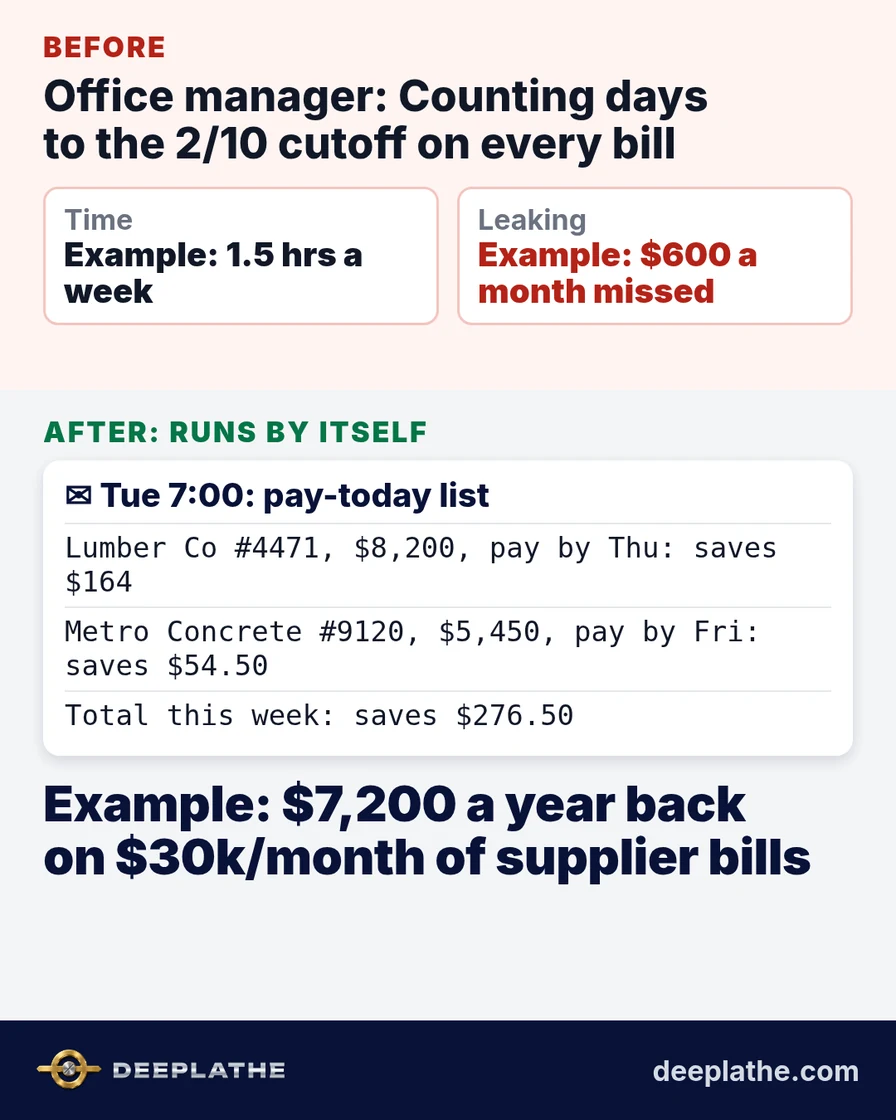
Either the office manager does it by hand. Example: twice a week, about 45 minutes each time, going through the open bills and the supplier emails. That's 1.5 hours a week, or about 78 hours a year, spent reading small print.
Or nobody does it, so bills get paid on day 28 to 30 out of habit, and the discount quietly expires.
The money is bigger than it looks. Example: $30,000 a month of supplier bills on 2/10 terms, at 2%, is $600 a month, or $7,200 a year you pay for nothing. Put another way: AccountingTools works out that skipping a 2/10 net 30 discount is like paying an annual interest rate of about 36.7% to hold your cash for 20 more days (AccountingTools). Very few business loans cost that much.
This is a different leak from suppliers raising prices. Here the price is fine. You're just paying it at the wrong time.
What runs by itself
The automation watches two things you already have: the bills sitting in your accounting software (QuickBooks or Xero), and the supplier invoices that arrive in your email.
The moment a new bill lands, the AI reads its payment terms. If the terms are on the bill record, it uses those. If they're only printed on the supplier's PDF ("2% 10 days, net 30", "1/15 net 45", "3% if paid by the 10th"), it reads them from the attachment, works out the exact discount deadline and the dollar value, and saves that next to the bill.
Then, on a schedule (say Tuesday and Friday at 7:00), it checks every open bill and decides three things: Is this bill still inside its discount window? How many days are left? How much does paying now save? It emails you a short list sorted by deadline, then by savings. Bills with no discount, or ones already past the window, are left out. If nothing qualifies that day, you get nothing.
Nobody opens a bill to read terms, nobody keeps a spreadsheet of deadlines, and nobody has to remember to look. You read a list and decide what to pay.
Setup is one connection between your accounting software, your inbox and an automation tool like Zapier or Make, with the AI reading each bill, scheduled to run on the days you pay bills. We can set this up for you.
Example: what lands in your inbox
Illustrative sample of the Tuesday email:
Pay-today list, Tue 7:00 (3 bills inside a discount window)
1. Lumber Co #4471, $8,200, 2/10 net 30, pay by Thu: saves $164
2. Metro Concrete #9120, $5,450, 1/10 net 30, pay by Fri: saves $54.50
3. Fence Supply Direct #3381, $2,900, 2/10 net 30, pay by Mon: saves $58
Total if paid this week: $16,550, saves $276.50
Missed last week: none
You can approve the payments in your usual bank or bill-pay tool. The list just tells you which ones are worth paying early and by when.
The time and money math
Assumptions, all labeled as examples:
- Example: $30,000 a month of supplier bills carry a 2% early payment discount.
- Example: before, the office manager spent 45 minutes twice a week checking bill terms and deadlines, or the discounts were simply missed.
- Example: after, reading the list and approving payments takes about 5 minutes per email.
Time back: about 1.5 hours a week drops to about 10 minutes, so roughly 1 hour 20 minutes back every week, or close to 70 hours a year. That's nearly two working weeks of office time spent on billing, scheduling or chasing your own unpaid invoices instead.
Money: Example: if you used to miss most discounts and now catch them, 2% of $30,000 a month is $600 a month, or $7,200 a year off your cost of materials. That goes straight to margin, because the jobs, crews and prices don't change.
Even if you only catch half of them (cash may be tight some weeks), that's still Example: $3,600 a year, plus the hours back.
If you'd rather put your own numbers in: take your monthly supplier spend on discount terms, multiply by the discount rate, then by 12. That's the ceiling of what this list can save.
Where it goes wrong (limits)
It can only list discounts it can see. If a supplier gives you 2% verbally or in a contract that never reaches your inbox or accounting software, the automation won't know. You add those terms once to that supplier's record and it picks them up from then on.
It reads terms from messy PDFs, and sometimes it will get one wrong, for example reading "net 10" as a discount term. That's why each line shows the terms it found. A strange-looking line is easy to spot and ignore.
It doesn't know your cash position unless you connect your bank balance. Paying early only makes sense when the cash is there. The list tells you what you could save, and you still decide what to pay.
Some suppliers count days from delivery, not invoice date. If yours do, the deadline needs that rule set once for that supplier.
And it only helps if bills get entered promptly. A bill keyed in on day 12 has already missed a 10-day window. If your bills arrive by email, the same automation can create the bill draft on arrival so the clock starts the same day.
What if it still doesn't work for you?
Maybe few of your suppliers offer discounts. Then the list will be short, and that's useful information too: it shows which suppliers do offer terms, which helps when you choose where to buy. You can also ask your bigger suppliers for 2/10 terms, now that you can actually use them.
Maybe the discount isn't worth paying early when cash is tight. The AccountingTools math says skipping a 2/10 net 30 discount works out to about 36.7% a year, so even borrowing on a line of credit to pay early is often cheaper. Your accountant can confirm that for your situation.
And if the list is wrong more than it's right after the first few weeks, turn it off. You've lost a few minutes of reading and nothing else. Nothing gets paid without you.
Built inside the tools you already use
This runs inside the QuickBooks or Xero account, inbox and bill-pay routine you already have. There's no new app for your office manager to learn and no new place to log into. You get one short email on bill days, and you decide what to pay. Every bill, payment and approval stays in your own accounts and under your control. At Deeplathe we build small jobs like this one into existing tools for trade and office businesses; you can see the kinds of jobs we set up on /solutions. For related reading, see how AI handles bank reconciliation in QuickBooks and what AI can take off a bookkeeper's plate.
Questions owners ask
What does it cost to run?
Mostly the automation tool's subscription (Zapier or Make) and a small amount of AI usage, both of which many businesses already pay for. Compare that with the discounts: Example: one $8,200 bill at 2% is $164, which on its own covers a month of a typical automation plan.
Will it work if my suppliers write terms differently?
Yes, that's the point of having the AI read them. Terms like "2% 10 net 30", "2/10 n/30" and "3% if paid by the 10th" all mean similar things, and it reads them the way a person would. When it can't tell, it shows the line as "terms unclear" instead of guessing.
What if it breaks or stops sending?
If the connection to QuickBooks, Xero or your inbox drops, the email doesn't arrive, and you're simply back to how things were. Zapier and Make both show a run history, so a missed run is easy to spot and fix.
Is my financial data safe?
It reads bills you already store in your accounting software and email. It doesn't move money or change payments. Access can be limited to bills and supplier email only. For more, see is customer data safe with AI tools.
Does my office manager still need to do anything?
Only the part that needs a person: deciding to pay. The reading, date-counting and reminding are gone, and that's where the 1.5 hours a week went.
Sources
- CFI: 2/10 Net 30, what the term means: 2% discount if paid within 10 days, otherwise full amount due in 30 days.
- AccountingTools: Credit terms and the cost of credit: 2/10 net 30 equals an effective annualized rate of 36.72%.
- Zapier: QuickBooks Online integrations: bill triggers and actions for automating QuickBooks bills.
Keep these
The working rules
Supplier early payment discounts stop slipping away: twice a week an automation reads your open bills in QuickBooks or Xero and emails you only the ones still inside their discount window, with the do
Floor vote
Where are you with this job?
One vote per device. Change it any time.
Loading votes…
Field check
Field check
Four questions. Honest answers. No score sent anywhere but this page.
01 / 04
Can you name the one job this piece is for, in one sentence?